Community Workshop
The RTB community creates extra content that anyone can subscribe to, download and use in their own projects.
Subscribing to content
All shared content is available to download from the RTB Workshop.
- Click Subscribe on any item you want. Steam downloads it for you.
- Restart RTB.
- Your downloaded XPacks appear under the Edit › XPacks menu.
Sharing your XPack
The Workshop Uploader tool shares your content through the Steam Workshop. Other RTB users can subscribe to your XPack and receive updates automatically as you add more content.
Preparing an upload
You'll need two things:
- The XPack you created.
- A preview image (JPG or PNG) to use as the thumbnail in the Workshop.
The Workshop uploads an entire folder, so your XPack must be in its own folder with no other files, not even the preview image.
Uploading in two steps
Start the Workshop Uploader from within Steam, then:
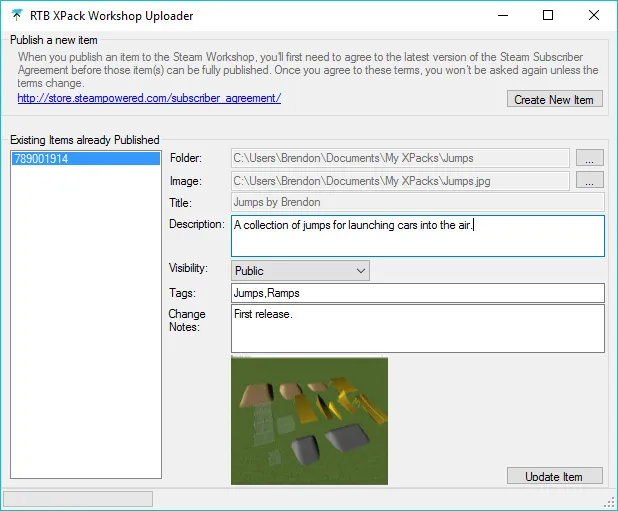
- Create New Item. This creates an empty placeholder for your Workshop item. The first time you do this, you'll need to accept Steam's Workshop legal agreement.
- Update Item. This does the actual upload. Set the folder (containing just the XPack) and the preview image path. The title is set from the XPack name automatically. Add a description, visibility and tags to help people find your XPack, then click Update Item to upload the folder to Steam.
You can run Update Item as many times as you like for the same XPack, so your subscribers get updates as you develop more content.
Available now on Steam
Start building your perfect race track today. Updates are freely available.